Email at your own domain.
Delivered to the inbox you already use.
Create addresses like hello@yourdomain.com. Messages sent to them are forwarded to your Gmail, Outlook, or any inbox you already check—no new mailbox, no new login.
Free · No credit card · Built for freelancers, small businesses, and startups

Early preview: live email forwarding isn't available yet.
Made for the way you work
Pick the addresses you need. Each one lands in the inbox of whoever handles it.
Freelancers
Look established from your first client email
Send clients to an address at your own domain instead of a personal Gmail—and keep working from the inbox you already know.
- A professional address on every proposal and invoice
- A separate alias per client or project, so mail is easy to filter
- Pause an alias when a project ends
Example addresses
hello@Your Gmailprojects@Your Gmailinvoices@Accounting inbox
Small businesses
Role addresses that outlast staff changes
Publish addresses customers remember and route each one to the person who handles it today.
- Customers write to info@ or support@, not to an employee's personal address
- Change who receives an address without changing the address
- See every address and where it goes in one workspace
Example addresses
info@Front deskorders@Sales inboxsupport@Support lead
Startups
Addresses for launch, hiring, and press
Set up the addresses a young company needs without moving to new mail hosting.
- Make ownership explicit—every alias shows its destination
- Add addresses as the team grows
- Keep your current email provider and setup
Example addresses
founders@Founders' inboxesjobs@Hiring inboxpress@Marketing inbox
Everything you need to run domain email
An alias for every purpose
Create hello@, invoices@, or jobs@ so every conversation has a clear address.
Keep your current inbox
Point aliases to Gmail, Outlook, or any inbox you already check. Receive-only: replies go out from that inbox's own address.
Domain ownership check
Add one TXT record to prove the domain is yours before any alias goes live.
Verified destinations
Each destination inbox is confirmed first, so mail only goes where you meant it to.
Pause any alias
Turn an address off when a project ends or spam starts, and back on when you need it.
One workspace overview
Domains, destinations, and aliases with their status, side by side.
Your DNS stays yours
CyanDB never changes DNS records for you. You review MX changes before making them.
Looking for ideas? Browse professional email aliases or compare forwarding with a mailbox.
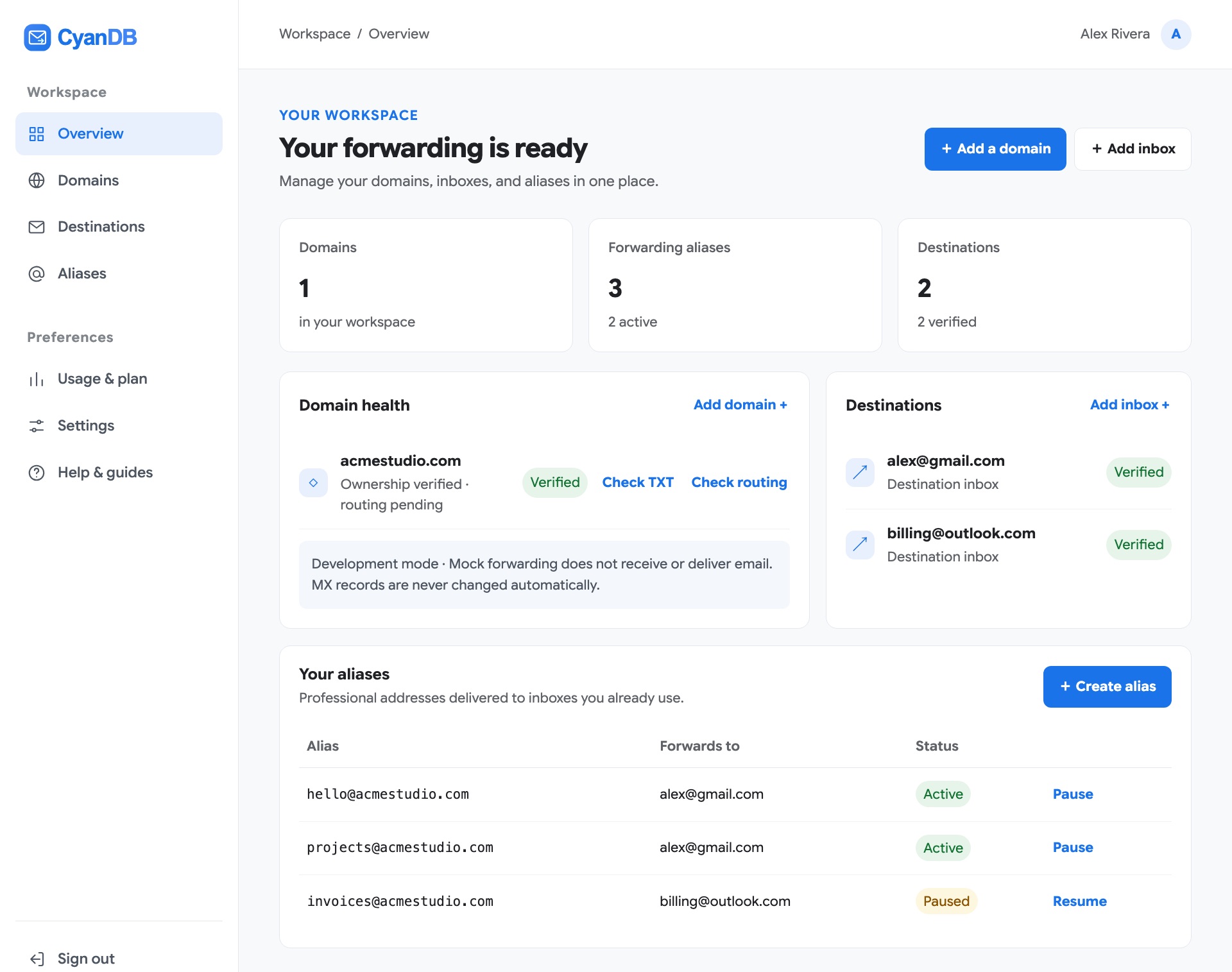
Your whole setup on one screen
The real CyanDB workspace: domains, destination inboxes, and aliases with their status.
Four steps to organize domain email
Review each part of the setup before relying on a new address.
Add a domain you own
Enter your domain and follow the TXT instructions to confirm ownership.
Choose a destination inbox
Add the existing inbox where you want an alias to point, then verify it.
Review mail routing
Check current DNS and provider requirements. MX record changes can affect existing email and need careful review.
Create an address for your work
Choose the alias name and connect it to your domain and destination.
Forwarding or a hosted mailbox?
Forwarding is enough when you mainly need to receive mail at your domain.
| Feature | CyanDB forwarding | Hosted mailbox |
|---|---|---|
| Where you read mail | The inbox you already use | A new mailbox and login |
| Cost | Free during early preview | Usually billed per user, per month |
| Send from your domain | Not supported (receive-only) | Supported |
| Best for | Memorable addresses that reach existing inboxes | Teams who send as the domain every day |
Product status and privacy
Where CyanDB is today
- Domain ownership verification
- Destination inbox verification
- Alias management, with pause and resume
- Live email forwarding: not available yet
How we treat your email
- Forwarded mail isn't stored; mail you choose to keep is deleted after 30 days
- Your DNS records are never changed automatically
- Domains and inboxes are verified before use
What is custom domain email forwarding?
Custom domain email forwarding lets you use an address at a domain you own—such as hello@yourdomain.com—and direct incoming messages to an inbox you already use. CyanDB is designed to help organize the domain, destination, and alias setup in one place.
CyanDB email forwarding FAQs
Can I send email from a CyanDB alias?
No. CyanDB is for managing receive-and-forward email setup. Sending email from an alias is not supported.
Do I need to create another mailbox?
No. CyanDB is designed to help manage custom-domain aliases that point to inboxes you already use.
Does CyanDB forward live email?
During early access, CyanDB forwards real email for selected domains. Forwarding for your own domain isn’t open yet; you can add and verify your domain now so it’s ready.
Will CyanDB change my DNS records automatically?
No. CyanDB does not change DNS records automatically. Review your email provider’s instructions before changing MX records, because incorrect changes can interrupt existing mail.
Bring your email setup into focus.
Create a workspace to organize domains, destinations, and aliases.
Real email forwarding is not currently available.